

Build applications with oneDAL#
This section contains instructions for building applications with oneDAL for SYCL*.
Applications on Linux* OS#
Install oneDAL.
Set environment variables by calling
<install dir>/vars.sh.Build the application using
icpx(Linux* OS) andicx-cl(Windows* OS) commands:Add oneDAL
includesfolder:-I<install dir>/dal/latest/include
Add oneDAL libraries. Choose the appropriate oneDAL libraries based on oneDAL linking method:
oneDAL libraries for Linux# Static linking
libonedal_core.a,libonedal_thread.a,libonedal.a,libonedal_parameters.aDynamic linking
libonedal_core.so,libonedal_thread.so,libonedal.so,libonedal_parameters.so,libonedal_dpc.so,libonedal_parameters_dpc.soAdd an additional oneDAL library:
<install dir>/mkl/latest/lib/libmkl_sycl.so
Applications on Windows* OS#
Install oneDAL.
In Microsoft Visual Studio* Integrated Development Environment (IDE), open or create a C++ project for your oneDAL application to build.
In project properties:
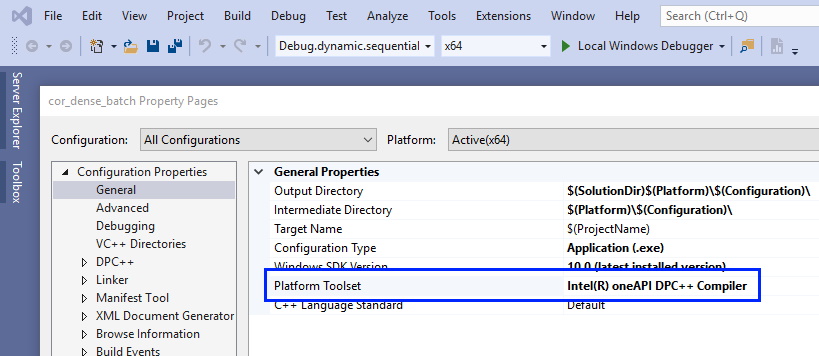
Set Intel® oneAPI DPC++/C++ Compiler platform toolset:
Add oneDAL
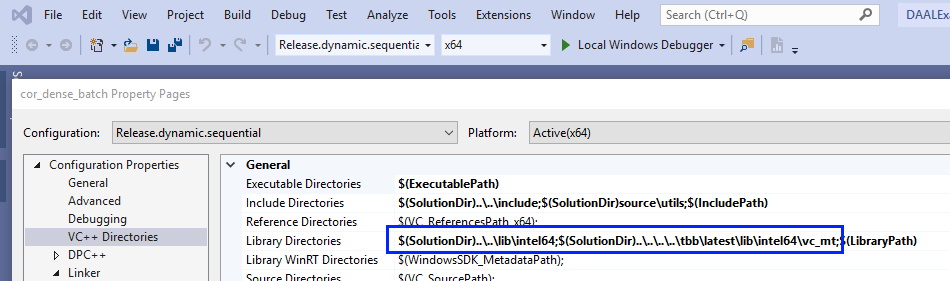
includesfolder to Additional Include Directories.Add folders with oneDAL and oneTBB libraries to Library Directories:
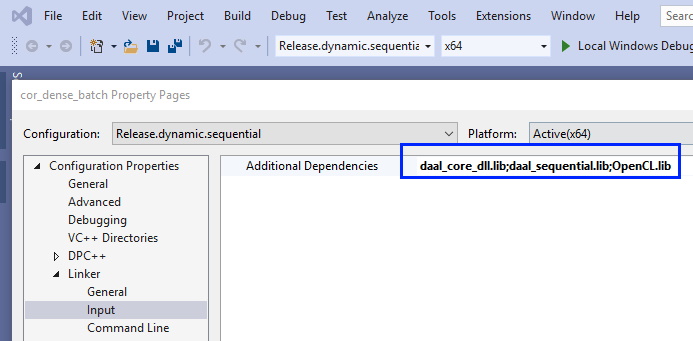
Add oneDAL and OpenCL libraries to Additional Dependencies:
Add the appropriate libraries to your project based on oneDAL linking method:
oneDAL libraries for Windows# Static linking
onedal_core.lib,onedal_thread.libDynamic linking
onedal_core_dll.libYou may also add debug versions of the libraries based on the threading mode and linking method:
oneDAL debug libraries for Windows# Static linking
onedal_cored.lib,onedald.lib,onedal_dpcd.lib,onedal_sycld.lib,onedal_threadd.libDynamic linking
onedal_cored_dll.lib (onedal_cored_dll.4.lib),onedald_dll.lib (onedald_dll.4.lib),onedal_dpcd_dll.lib (onedal_dpcd_dll.4.lib),onedald.4.dll,onedal_cored.4.dll,onedal_dpcd.4.dll,onedal_threadd.4.dll
Examples#
Dynamic linking oneDAL with the GPU target:
Linux* OS:
icpx -fsycl my_first_dal_program.cpp -Wl,--start-group \
-L$DALROOT/latest/lib -lonedal_core -lonedal_dpc -lonedal_parameters_dpc -lonedal_thread -lpthread -ldl -L<install dir>/tbb/latest/lib/ -ltbb -ltbbmalloc \
-lmkl_sycl_blas -lmkl_sycl_lapack -lmkl_sycl_sparse -lmkl_sycl_rng -lmkl_intel_lp64 -lmkl_gnu_thread -lmkl_core  -Wl,--end-group
Windows* OS:
icx -fsycl my_first_dal_program.cpp \
onedal_core_dll.lib onedal_dpc_dll.lib onedal_parameters_dpc_dll.lib onedal_thread_dll.lib \
tbb.lib tbbmalloc.lib \
%MKLROOT%\lib\mkl_sycl_blas_dll.lib \
%MKLROOT%\lib\mkl_sycl_lapack_dll.lib \
%MKLROOT%\lib\mkl_sycl_sparse_dll.lib \
%MKLROOT%\lib\mkl_sycl_rng_dll.lib \
%MKLROOT%\lib\mkl_core_dll.lib \
%MKLROOT%\lib\mkl_intel_lp64_dll.lib \
%MKLROOT%\lib\mkl_intel_thread_dll.lib \
libiomp5md.lib